
A subdomain is an additional part of your primary domain. For example, blog.example.com is a subdomain. Please, follow this tutorial to create a subdomain in cPanel.
1. Log in to your cPanel account.
2. In the Domains section, click on Subdomains. 
3. Under the Subdomain field, enter your subdomain name, such as demo. Select the appropriate domain from the drop-down list if you have several domains.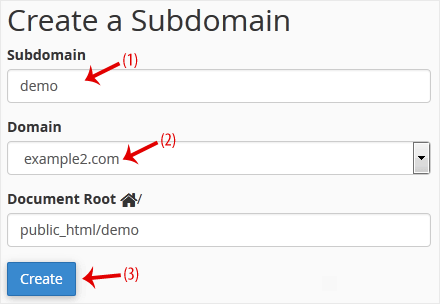
4. Click on Create.
You should see a success message that the subdomain has been created.
Bilgi bankasını detaylı olarak incelediniz, fakat ihtiyacınız olan bilgiyi bulamıyorsanız,
Bir Destek Talebi Oluşturun.



 Türkiye (Türkçe)
 Worldwide (English)