


X

Lütfen Ülke (Bölge) Seçiniz

Türkiye (Türkçe)Türkiye (Türkçe) Worldwide (English)Worldwide (English)
X

Lütfen Para Birimi Seçiniz

Türk Lirası $ US Dollar
X

Lütfen Ülke (Bölge) Seçiniz

Türkiye (Türkçe)Türkiye (Türkçe) Worldwide (English)Worldwide (English)
X

Lütfen Para Birimi Seçiniz

Türk Lirası $ US Dollar

Bilgi Bankası

AnasayfaBilgi BankasıTestHow to Enable/Disable Features of c...

How to Enable/Disable Features of cPanel Account From WHM

You can enable/disable features of your customers' cPanel account from WHM. Follow this tutorial if you do not want to provide access to PHP Setting, SSL, or anything else.


1. Log in to your WHM Account.


2. Go to Packages >> Feature Manager or type Feature Manager in the menu filter box. The option will appear. Click on it.
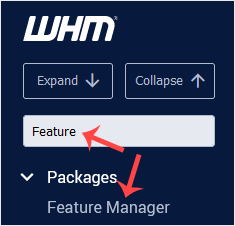

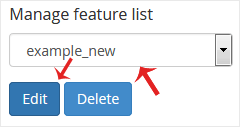
3. Under the Feature Manager list, choose your feature list from the drop-down menu and then click on Edit.


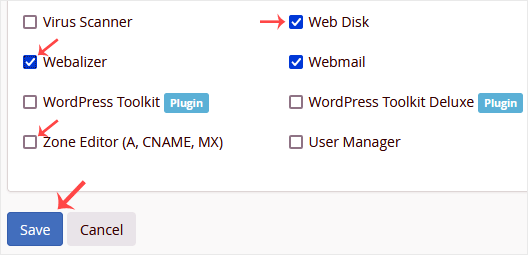
4. To enable any feature, check-mark the feature you wish to enable. For disabling, uncheck the feature you want to disable and then click on Save.

Aradığınız Bilgiyi Bulamıyor musunuz?

Bilgi bankasını detaylı olarak incelediniz, fakat ihtiyacınız olan bilgiyi bulamıyorsanız,

Bir Destek Talebi Oluşturun.
Faydalı Buldunuz mu?
(113 defa görüntülendi. / 0 kişi faydalı buldu.)

Powered by WISECP

Ürün ve hizmetlerimiz hakkında daha detaylı bilgi almak için hemen arayın.

+908503078246

ABONE OL

Kampanya ve duyurularımızdan haberdar olmak için kaydolun.

Whatsapp Destek
Satış öncesi destek!

Whatsapp Destek
Merhabalar 👋

Satış öncesi desteğe mi ihtiyacınız var?
17:00
×

