 VEATicaret
Çok Yakında! İşinizi internete taşıyalım!
PHP Scriptler
VEATicaret
Çok Yakında! İşinizi internete taşıyalım!
PHP Scriptler
 HazırYazılımlar
Mobil Uyumlu Hazır Scriptler
Profesyonel Web Tasarım
HazırYazılımlar
Mobil Uyumlu Hazır Scriptler
Profesyonel Web Tasarım
 WebTasarım
Kısa Sürede Uygun Fiyata Web Siteniz Olsun
Logo & Grafik Tasarımı
WebTasarım
Kısa Sürede Uygun Fiyata Web Siteniz Olsun
Logo & Grafik Tasarımı
 LogoTasarım
Size Özel Vektörel Logo Tasarım Hizmetimiz
LogoTasarım
Size Özel Vektörel Logo Tasarım Hizmetimiz
1. Log in to your cPanel account.
2. In the Databases section, click on phpMyAdmin.
3. Click the Expand icon from the navigation tree in the left sidebar.
4. Scroll down and mark Check All. Then click on the drop-down arrow and select Repair table.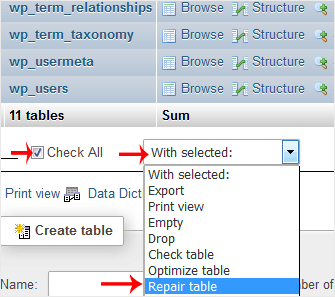
If the table has been repaired successfully, it will show an OK message. Otherwise, it will display an error on some tables.
 Copyright © 2026 All Rights Reserved

 Turkey (Türkçe)
 Worldwide (English)
