
X
X

Select Your Currency

Türk Lirası $ US Dollar
X
X

Select Your Currency

Türk Lirası $ US Dollar

Knowledge Base

HomepageKnowledge BaseTestHow to Redirect an Add-on Domain in...

How to Redirect an Add-on Domain in cPanel

You can redirect your add-on domain to another domain.


1. Log in to your cPanel account.


2. In the Domains section, click on Addon Domains.

 

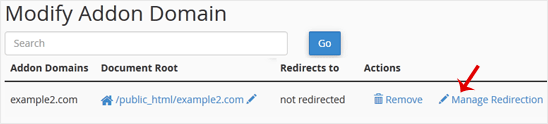
3. Under Modify Addon Domain, locate the add-on domain and click on Manage Redirection.

4. Enter the link to which you wish to redirect the add-on domain in the available text box.
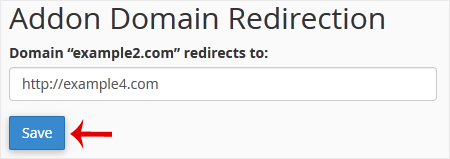

5. Click on Save.

Can't find the information you are looking for?

Create a Support Ticket
Did you find it useful?
(97 times viewed / 0 people found it helpful)

Powered by WISECP

Call now to get more detailed information about our products and services.

+908503078246

Subscribe

Sign up to be notified of our campaigns and announcements.

Whatsapp Destek
Satış öncesi destek!

Whatsapp Destek
Merhabalar 👋

Satış öncesi desteğe mi ihtiyacınız var?
17:01
×
