 VEATicaret
Çok Yakında! İşinizi internete taşıyalım!
PHP Scriptler
VEATicaret
Çok Yakında! İşinizi internete taşıyalım!
PHP Scriptler
 HazırYazılımlar
Mobil Uyumlu Hazır Scriptler
Profesyonel Web Tasarım
HazırYazılımlar
Mobil Uyumlu Hazır Scriptler
Profesyonel Web Tasarım
 WebTasarım
Kısa Sürede Uygun Fiyata Web Siteniz Olsun
Logo & Grafik Tasarımı
WebTasarım
Kısa Sürede Uygun Fiyata Web Siteniz Olsun
Logo & Grafik Tasarımı
 LogoTasarım
Size Özel Vektörel Logo Tasarım Hizmetimiz
LogoTasarım
Size Özel Vektörel Logo Tasarım Hizmetimiz
Apache SpamAssassin is a mail filter that identifies spam. An intelligent email filter uses various tests to identify unsolicited bulk email, more commonly known as spam. These tests examine email headers and content to classify emails with advanced statistical methods.
1. Log in to your cPanel Account.
2. In the Email section, click on Spam Filters.

3. Toggle Process New Emails and Mark them as Spam to enable it. If the knob/toggle is greyed out, this indicates that Apache SpamAssassin is disabled.

4. Enable SpamBox by clicking on Move New Spam to a Separate Folder (Spam Box).
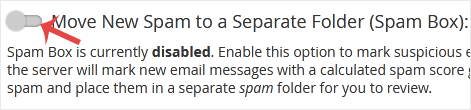
From now on, spam messages with a spam score of 5 or higher will be automatically removed by Spam Assassin.
 Copyright © 2026 All Rights Reserved

 Turkey (Türkçe)
 Worldwide (English)
