 VEATicaret
Çok Yakında! İşinizi internete taşıyalım!
PHP Scriptler
VEATicaret
Çok Yakında! İşinizi internete taşıyalım!
PHP Scriptler
 HazırYazılımlar
Mobil Uyumlu Hazır Scriptler
Profesyonel Web Tasarım
HazırYazılımlar
Mobil Uyumlu Hazır Scriptler
Profesyonel Web Tasarım
 WebTasarım
Kısa Sürede Uygun Fiyata Web Siteniz Olsun
Logo & Grafik Tasarımı
WebTasarım
Kısa Sürede Uygun Fiyata Web Siteniz Olsun
Logo & Grafik Tasarımı
 LogoTasarım
Size Özel Vektörel Logo Tasarım Hizmetimiz
LogoTasarım
Size Özel Vektörel Logo Tasarım Hizmetimiz
1. Log in to your Plesk account.
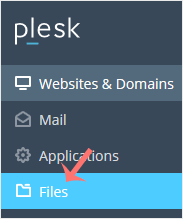
2. Click on Files from the Sidebar Menu.
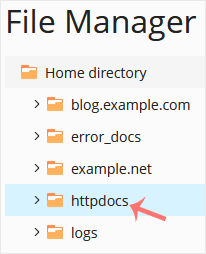
3. Under File Manager, enter the httpdocs directory.
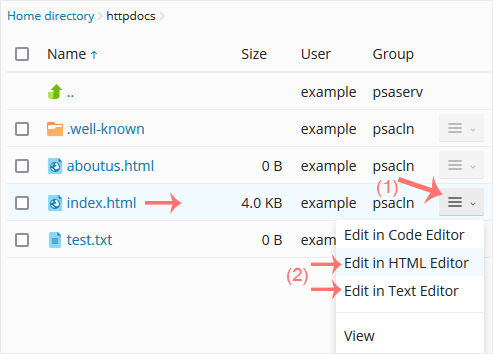
4. Hover over the file. The corresponding line will be highlighted. Next, click on the Menu Icon  , located at the end of the line, and the Context Menu will open. Click on Edit In HTML Editor or choose any other suitable editor.
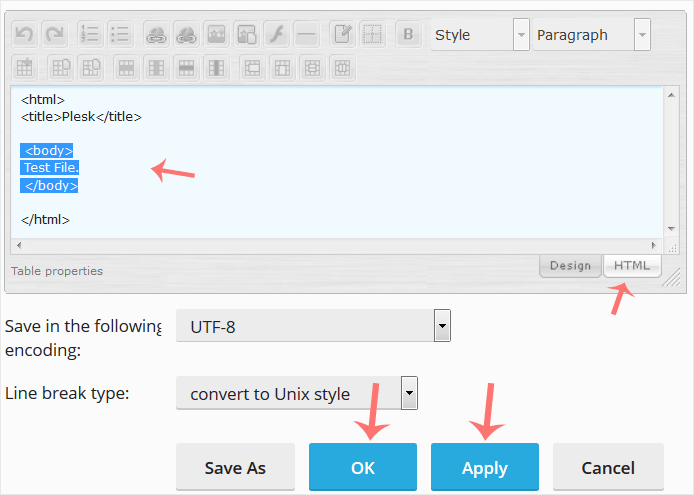
5. Make changes to your file and confirm with OK.
 Copyright © 2026 All Rights Reserved

 Turkey (Türkçe)
 Worldwide (English)
