 VEATicaret
Çok Yakında! İşinizi internete taşıyalım!
PHP Scriptler
VEATicaret
Çok Yakında! İşinizi internete taşıyalım!
PHP Scriptler
 HazırYazılımlar
Mobil Uyumlu Hazır Scriptler
Profesyonel Web Tasarım
HazırYazılımlar
Mobil Uyumlu Hazır Scriptler
Profesyonel Web Tasarım
 WebTasarım
Kısa Sürede Uygun Fiyata Web Siteniz Olsun
Logo & Grafik Tasarımı
WebTasarım
Kısa Sürede Uygun Fiyata Web Siteniz Olsun
Logo & Grafik Tasarımı
 LogoTasarım
Size Özel Vektörel Logo Tasarım Hizmetimiz
LogoTasarım
Size Özel Vektörel Logo Tasarım Hizmetimiz
Before adding the addon domain, point your addon domain nameservers to your primary domain nameservers and wait for domain propagation. It usually takes between 12 and 24 hours for the changes to take effect.
1. Log in to your cPanel account.
2. In the Domains section, click on Addon Domains.

3. Under the Create an Addon Domain, enter the following details:
New Domain Name: Your Addon domain name, such as example2.com.
Subdomain: It fills up automatically.
Document Root: It fills up automatically.
Leave the option Create an FTP account associated with this Addon Domain as it is.
4. Click on Add Domain.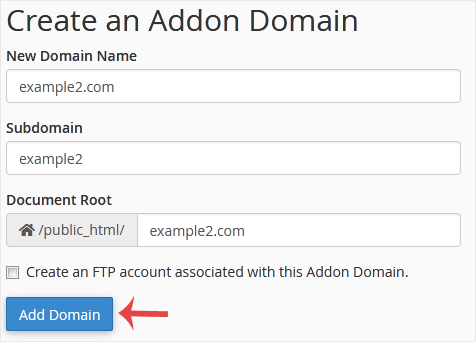
You should see a message that the addon domain has been created.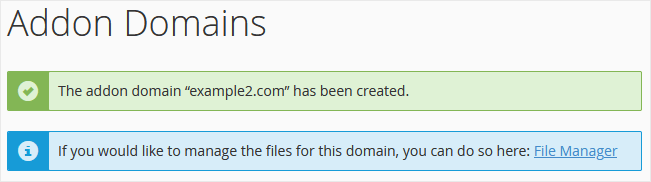
 Copyright © 2026 All Rights Reserved

 Turkey (Türkçe)
 Worldwide (English)
