


 Turkey (Türkçe)
 Worldwide (English)
To change the main root FTP account, you must change your SiteWorx account's password. However, if you need to change the password of a specific FTP account, follow this instruction.
1. Log in to your SiteWorx account.
2. In the FTP section, click on Accounts.
3. Click on the Pencil icon next to the FTP account. 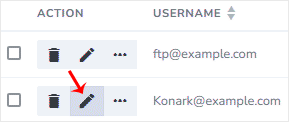
4. Enter the new password or click on Magic Wand to generate one.
5. Click on Save.
Now, you can access the FTP user account with your new password.


