
X

Lütfen Ülke (Bölge) Seçiniz

Türkiye (Türkçe)Türkiye (Türkçe) Worldwide (English)Worldwide (English)
X

Lütfen Para Birimi Seçiniz

Türk Lirası $ US Dollar
X

Lütfen Ülke (Bölge) Seçiniz

Türkiye (Türkçe)Türkiye (Türkçe) Worldwide (English)Worldwide (English)
X

Lütfen Para Birimi Seçiniz

Türk Lirası $ US Dollar

Bilgi Bankası

AnasayfaBilgi BankasıTestHow to Update the cPanel's Contact ...

How to Update the cPanel's Contact Information or Receive a Notification on Reaching the Resource Limit

If you want to receive a notification on reaching your disk quota, bandwidth usage limit or wish to update the cPanel's contact information, follow these steps.


1. Log in to your cPanel account.


2. In the Preferences section, click on Contact Information.

 

3. You should see an input box below the line that says, Enter an email address to receive account notifications and password reset confirmationsUpdate your existing email address or add your secondary email address in the second email input box.


4. Click on Save.
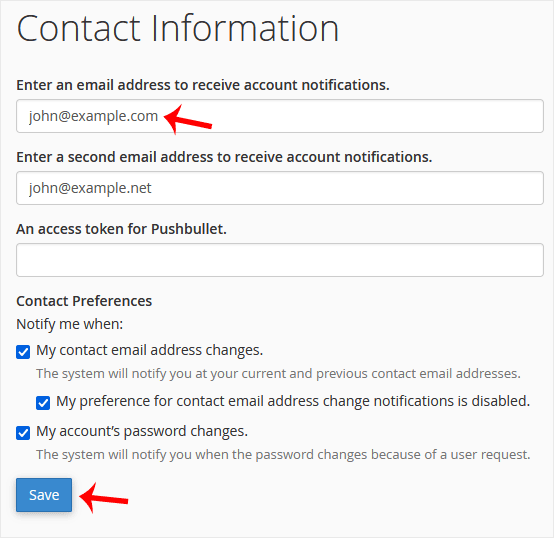
 

Your email address has been updated.

Aradığınız Bilgiyi Bulamıyor musunuz?

Bilgi bankasını detaylı olarak incelediniz, fakat ihtiyacınız olan bilgiyi bulamıyorsanız,

Bir Destek Talebi Oluşturun.
Faydalı Buldunuz mu?
(59 defa görüntülendi. / 0 kişi faydalı buldu.)

Powered by WISECP

Ürün ve hizmetlerimiz hakkında daha detaylı bilgi almak için hemen arayın.

+908503078246

ABONE OL

Kampanya ve duyurularımızdan haberdar olmak için kaydolun.

Whatsapp Destek
Satış öncesi destek!

Whatsapp Destek
Merhabalar 👋

Satış öncesi desteğe mi ihtiyacınız var?
17:01
×
