


Y���kleniyor...
X

Lütfen Ülke (Bölge) Seçiniz

Türkiye (Türkçe)Türkiye (Türkçe) Worldwide (English)Worldwide (English)
X

Lütfen Para Birimi Seçiniz

Türk Lirası $ US Dollar
X

Lütfen Ülke (Bölge) Seçiniz

Türkiye (Türkçe)Türkiye (Türkçe) Worldwide (English)Worldwide (English)
X

Lütfen Para Birimi Seçiniz

Türk Lirası $ US Dollar
Bilgi Bankası How to Suspend a cPanel User in the WHM Account

How to Suspend a cPanel User in the WHM Account

68 görüntüleme 0 faydalı buldu

You can suspend ? cPanel user from accessing your WHM account.


1. Log in to your WHM Account.


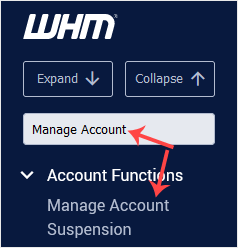
2. Go to Account Functions >> Manage Account Suspension or type Manage Account in the menu filter box. The option will appear. Click on it.


3. Under Select by domain, choose the user you want to suspend. Select the user from the drop-down list under Select by username.
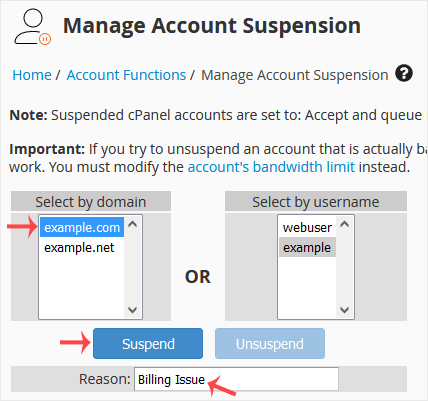


4. You can add a suspension reason. Type the reason and click on Suspend.


The account will be suspended, and the suspension message will display.

Aradığınız Bilgiyi Bulamıyor musunuz?

Bilgi bankasını detaylı olarak incelediniz, fakat ihtiyacınız olan bilgiyi bulamıyorsanız,

Bir Destek Talebi Oluşturun.

Faydalı Buldunuz mu?


