


X

Lütfen Ülke (Bölge) Seçiniz

Türkiye (Türkçe)Türkiye (Türkçe) Worldwide (English)Worldwide (English)
X

Lütfen Ülke (Bölge) Seçiniz

Türkiye (Türkçe)Türkiye (Türkçe) Worldwide (English)Worldwide (English)

Bilgi Bankası

AnasayfaBilgi BankasıTestHow to Remove a Subdomain in cPanel

How to Remove a Subdomain in cPanel

A subdomain is an additional part of your primary domain. Please, follow this tutorial to remove a subdomain in cPanel.


1. Log in to your cPanel account.


2. In the Domains section, click on Subdomains.

 

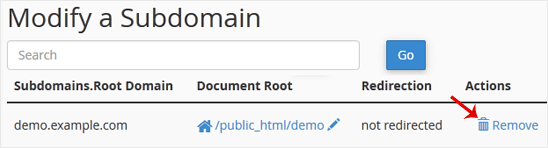
3. Under the Modify a Subdomain list, you can see a list of subdomains.

4. Click on Remove under the Actions tab.

5. For confirmation, click on Delete Subdomain to remove your subdomain permanently.


Aradığınız Bilgiyi Bulamıyor musunuz?

Bilgi bankasını detaylı olarak incelediniz, fakat ihtiyacınız olan bilgiyi bulamıyorsanız,

Bir Destek Talebi Oluşturun.
Faydalı Buldunuz mu?
(123 defa görüntülendi. / 0 kişi faydalı buldu.)

Powered by WISECP
Top


