


Y���kleniyor...
X

Lütfen Ülke (Bölge) Seçiniz

Türkiye (Türkçe)Türkiye (Türkçe) Worldwide (English)Worldwide (English)
X

Lütfen Para Birimi Seçiniz

Türk Lirası $ US Dollar
X

Lütfen Ülke (Bölge) Seçiniz

Türkiye (Türkçe)Türkiye (Türkçe) Worldwide (English)Worldwide (English)
X

Lütfen Para Birimi Seçiniz

Türk Lirası $ US Dollar
Bilgi Bankası How to Remove a Post in WordPress

How to Remove a Post in WordPress

75 görüntüleme 0 faydalı buldu

You can remove the published or draft post in WordPress.


1. Log in to the WordPress dashboard.


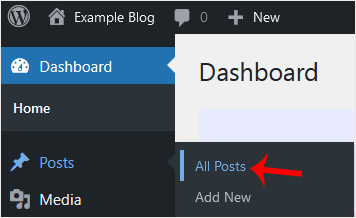
2. From the Dashboard menu, go to Posts and click on All Posts.


3. Hover your mouse to the post you want to remove, and click on Trash.
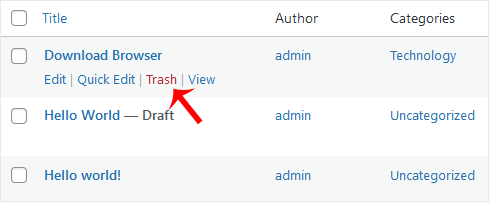

You will get a message that the post has been moved to Trash.

Aradığınız Bilgiyi Bulamıyor musunuz?

Bilgi bankasını detaylı olarak incelediniz, fakat ihtiyacınız olan bilgiyi bulamıyorsanız,

Bir Destek Talebi Oluşturun.

Faydalı Buldunuz mu?


