


Y���kleniyor...
X

Lütfen Ülke (Bölge) Seçiniz

Türkiye (Türkçe)Türkiye (Türkçe) Worldwide (English)Worldwide (English)
X

Lütfen Para Birimi Seçiniz

Türk Lirası $ US Dollar
X

Lütfen Ülke (Bölge) Seçiniz

Türkiye (Türkçe)Türkiye (Türkçe) Worldwide (English)Worldwide (English)
X

Lütfen Para Birimi Seçiniz

Türk Lirası $ US Dollar
Bilgi Bankası How to Delete an FTP Account in SiteWorx

How to Delete an FTP Account in SiteWorx

70 görüntüleme 0 faydalı buldu

If you want to delete an FTP account, you can do it in the following way:


1. Log in to your SiteWorx account.

2. In the FTP section, click on Accounts.


3. Select the appropriate FTP account you want to remove and choose Delete from the drop-down menu.
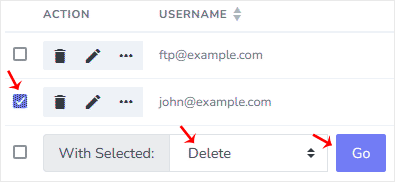
4. Click on Go and confirm with Delete.


You should see a message that the FTP account has been removed.

Aradığınız Bilgiyi Bulamıyor musunuz?

Bilgi bankasını detaylı olarak incelediniz, fakat ihtiyacınız olan bilgiyi bulamıyorsanız,

Bir Destek Talebi Oluşturun.

Faydalı Buldunuz mu?


