


Y���kleniyor...
X

Lütfen Ülke (Bölge) Seçiniz

Türkiye (Türkçe)Türkiye (Türkçe) Worldwide (English)Worldwide (English)
X

Lütfen Para Birimi Seçiniz

Türk Lirası $ US Dollar
X

Lütfen Ülke (Bölge) Seçiniz

Türkiye (Türkçe)Türkiye (Türkçe) Worldwide (English)Worldwide (English)
X

Lütfen Para Birimi Seçiniz

Türk Lirası $ US Dollar
Bilgi Bankası How to Change the Password of the FTP Account in cPanel

How to Change the Password of the FTP Account in cPanel

90 görüntüleme 0 faydalı buldu

To change the main root FTP account, you have to change the password of your cPanel account. However, if you need to change the password of a specific FTP account, follow this instruction.


1. Log in to your cPanel account.


2. In the Files section, click on FTP Accounts.



3. Under the list of FTP accounts, click on Change Password and enter a new password. Alternatively, use the password generator to generate one.
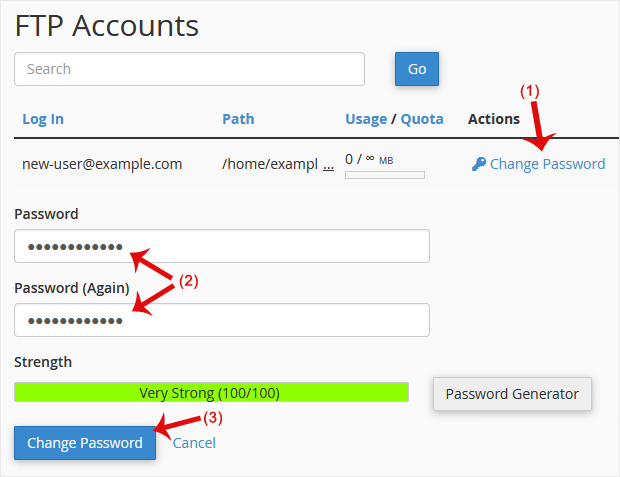

4. Click on Change Password.


Now you can access FTP with your new password.

Aradığınız Bilgiyi Bulamıyor musunuz?

Bilgi bankasını detaylı olarak incelediniz, fakat ihtiyacınız olan bilgiyi bulamıyorsanız,

Bir Destek Talebi Oluşturun.

Faydalı Buldunuz mu?


