cPanel supports many languages. If you want to change your cPanel language to a native one, you should follow this tutorial.
1. Log in to your cPanel account.
2. In the Preferences section, click on Change Language. 
3. Select the appropriate language from the drop-down menu and click on Change.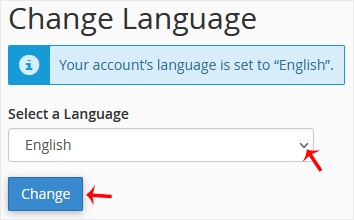
The language in your cPanel has been successfully changed.
Bilgi bankasını detaylı olarak incelediniz, fakat ihtiyacınız olan bilgiyi bulamıyorsanız,
Bir Destek Talebi Oluşturun. Copyright © 2026 Tüm Hakları Saklıdır.

 Türkiye (Türkçe)
 Worldwide (English)
