


X

Lütfen Ülke (Bölge) Seçiniz

Türkiye (Türkçe)Türkiye (Türkçe) Worldwide (English)Worldwide (English)
X

Lütfen Ülke (Bölge) Seçiniz

Türkiye (Türkçe)Türkiye (Türkçe) Worldwide (English)Worldwide (English)

Bilgi Bankası

AnasayfaBilgi BankasıTestHow to Change the Language in SiteW...

How to Change the Language in SiteWorx

SiteWorx supports many languages. If you want to change your SiteWorx's language to a native one, you should follow this tutorial.


1. Log in to your SiteWorx account.

2. In the Administration section, click on User Accounts.


3. Click on the Pencil icon attached to your SiteWorx account.


4. Select the appropriate language from the drop-down menu and click Save.
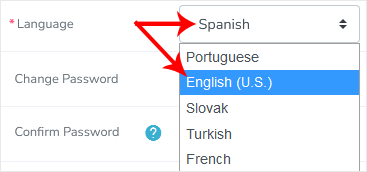

Your SiteWorx's language setting has been successfully updated.

Aradığınız Bilgiyi Bulamıyor musunuz?

Bilgi bankasını detaylı olarak incelediniz, fakat ihtiyacınız olan bilgiyi bulamıyorsanız,

Bir Destek Talebi Oluşturun.
Faydalı Buldunuz mu?
(105 defa görüntülendi. / 0 kişi faydalı buldu.)

Powered by WISECP
Top


